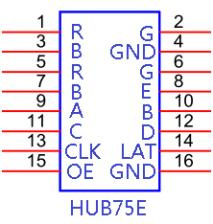
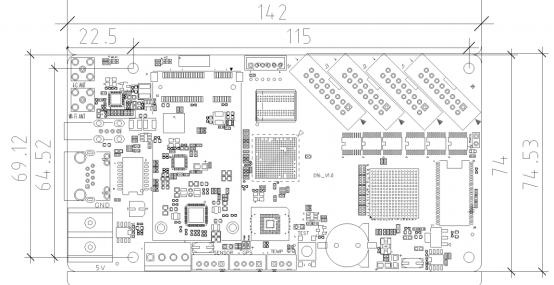
 1. Standard Wi-Fi module, mobile App wireless management; 2. Support 256~65536 grayscale; 3. Support Video, Picture, Animation, Clock, Neon background; 4. Support word art, animated background, neon light effect; 5. U-disk unlimited expansion program, plug in broadcast; 6. No need set IP, HD-D15 could be identified by controller ID automatically; 7. Support 4G/Wi-Fi/ and network cluster management remote management; 8. Support 720P video hardware decoding, 60HZ frame rate output.1. The internet cluster management diagram is as follows: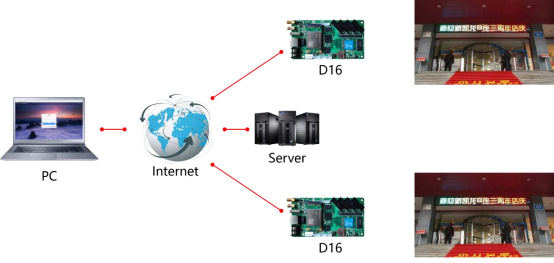
| Features | Parameters |
| Module type | Static to 1-64 scan modules |
| Control Range | 1024*64,Widest:1024, Highest:256 |
| Gray Scale | 256~65536 |
| Video Formats | 60Hz,frame,rate,output,support 720P video hardware decoding, direct transmission, no transcoding waiting. AVI, WMV, MP4, 3GP, ASF, MPG,FLV, F4V, MKV, MOV, DAT, VOB, TRP, TS,WEBM, etc. |
| Animation Formats | SWF, FLV , GIF |
| Image Formats | BMP, JPG, JPEG, PNG etc. |
| Text | Support text message editing, inserting picture; |
| Time | analog clock, digital clock and a variety of dial clock functions |
| Other function | Neon,animations,function;Clockwise/counter,clockwise,count; support temperature and humidity;Adaptive brightness adjustment function |
| Memory | 4GB memory, more than 4 hours’ program support. Indefinitely expanding memory by U-disk; |
| Communication | U-disk/Wi-Fi/LAN/4G(Optional) |
| Port | 5V Power *1, 10/100M RJ45 *1, USB 2.0 *1, HUB75E *4 |
| Power | 5W |
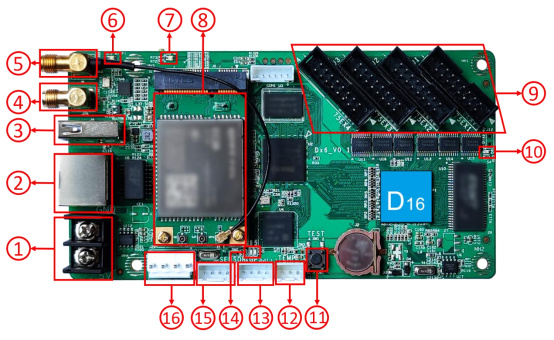 1. Power terminal, connect 5V power; 2. RJ45 network port and the computer network port , router or switch connected to the normal working state is orange light is always on, green light flashes; 3. USB port: connect to the USB device for update program; 4. Wi-Fi Antenna connector socket: weld antenna socket of Wi-Fi; 5. 4G Antenna connector socket: weld antenna socket of 4G(Optional); 6. Wi-Fi indicator light: display Wi-Fi work status; 7. 4G indicator light: display 4G network status; 8. 4G module: Used to provide control card to access the Internet (Optional); 9. HUB75E port: connect LED screen by cable,; 10. Display light (Display), normal working state is flashing; 11. Test button: for test the brightness and contrast of the display screen; 12. Temperature Sensor port: for connect to Temperature; 13. GPS port: for connect to GPS module, use for time correction and fixed position; 14. Indicator light: PWR is the power indicator, the power supply normal indicator is always on; RUN is the indicator, the normal working indicator flashes; 15. Sensor port: for connect external sensor, Such as environmental monitoring, multi-function sensors, etc.; 16. Power port: Foolproof 5V DC power interface, the same function as 1.
 | Minimum | Typical | Maximum | |
| Rated voltage(V) | 4.2 | 5.0 | 5.5 |
| Storage temperature(℃) | -40 | 25 | 105 |
| Work environment temperature(℃) | -40 | 25 | 80 |
| Work environment humidity (%) | 0.0 | 30 | 95 |
| Net weight (kg) | 0.06 | ||
| Certificate | CE, FCC, RoHS | ||
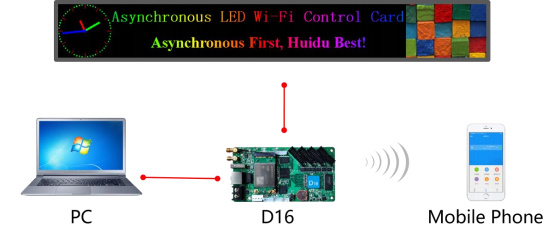 2. The control card can be connected directly with the computer Wi-Fi to update the programs, as shown below:Support 4 groups HUB 75E parallel data are defined ad follows: