 CE, UL&CUL, IC, FCC, EAC, UKCA, KC, RCM, CB, RoHS⬤Input connectors − 1x HDMI 1.3 (IN & LOOP) − 1x HDMI 1.3 − 1x DVI (IN & LOOP) − 1x 3G-SDI (IN & LOOP) − 1x 10G optical fiber port (OPT1) ⬤Output connectors − 6x Gigabit Ethernet ports A single device unit drives up to 3.9 million pixels, with a maximum width of 10,240 pixels and a maximum height of 8192 pixels. − 2x Fiber outputs OPT 1 copies the output on 6 Ethernet ports. OPT 2 copies or backs up the output on 6 Ethernet ports. − 1x HDMI 1.3 For monitoring or video output ⬤Self-adaptive OPT 1 for either video input or sending card output Thanks to the self-adaptive design, OPT 1 can be used as either an input or output connector, depending on its connected device. ⬤Audio input and output − Audio input accompanied with HDMI input source − Audio output via a multifunction card − Output volume adjustment supported ⬤Low latency Reduce the delay from the input to receiving card to 20 lines when the low latency function and Bypass mode are both enabled. ⬤3x layers − Adjustable layer size and position − Adjustable layer priority ⬤Output synchronization An internal input source or external Genlock can be used as the sync source to ensure the output images of all cascaded units in sync. ⬤Powerful video processing − Based on SuperView III image quality processing technologies to provide stepless output scaling − One-click full screen display − Free input cropping ⬤Easy preset saving and loading − Up to 10 user-defined presets supported − Load a preset by simply pressing one button ⬤Multiple kinds of hot backup − Backup between devices − Backup between Ethernet ports − Backup between input sources ⬤Mosaic input source supported The mosaic source is composed of two sources (2K×1K@60Hz) accessed to the OPT 1. ⬤Up to 4 units cascaded for image mosaic ⬤Three working modes − Video Controller − Fiber Converter − Bypass ⬤All-round color adjustment Input source and LED screen color adjustment supported, including brightness, contrast, saturation, hue and Gamma ⬤Pixel level brightness and chroma calibration Work with NovaLCT and NovaStar calibration software to support brightness and chroma calibration on each LED, effectively removing color discrepancies and greatly improving LED display brightness and chroma consistency, allowing for better image quality. ⬤Multiple operation modes Control the device as you wish via V-Can, NovaLCT or device front panel knob and buttons.
| ElectricalParameters | Power connector | 100–240V~, 1.5A, 50/60Hz | |
| Rated powerconsumption | 28 W | ||
| OperatingEnvironment | Temperature | 0°C to 45°C | |
| Humidity | 20% RH to 90% RH, non-condensing | ||
| StorageEnvironment | Temperature | –20°C to +70°C | |
| Humidity | 10% RH to 95% RH, non-condensing | ||
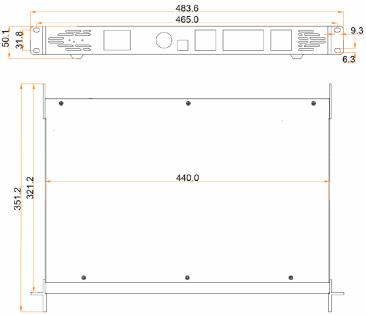
| Physical Specifications | Dimensions | 483.6 mm × 351.2 mm × 50.1 mm | |
| Net weight | 4 kg | ||
| PackingInformation | Accessories | Flight Case | Carton |
| 1x Power cord1x HDMI to DVI cable 1x USB cable 1x Ethernet cable 1x HDMI cable 1x Quick Start Guide 1x Certificate of Approval 1x DAC cable | 1x Power cord1x HDMI to DVI cable 1x USB cable 1x Ethernet cable 1x HDMI cable 1x Quick Start Guide 1x Certificate of Approval 1x Safety Manual 1x Customer Letter | ||
| Packing size | 521.0 mm × 102.0 mm × 517.0 mm | 565.0 mm × 175.0 mm × 450.0 mm | |
| Gross weight | 10.4 kg | 6.8 kg | |
| Noise Level (typical at 25°C/77°F) | 45 dB (A) | ||

| Connector | ||
| 3G-SDI | ||
| 2 | Max. input resolution: 1920×1200@60Hz HDCP 1.4 compliant Interlaced signal inputs supported Custom resolutions supported − Max. width: 3840 (3840×648@60Hz) − Max. height: 2784 (800×2784@60Hz) − Forced inputs supported: 600×3840@60Hz Loop output supported on HDMI 1.3-1 | |
| DVI | 1 | Max. input resolution: 1920×1200@60Hz HDCP 1.4 compliant Interlaced signal inputs supported Custom resolutions supported − Max. width: 3840 (3840×648@60Hz) − Max. height: 2784 (800×2784@60Hz) − Forced inputs supported: 600×3840@60Hz Loop output supported on DVI 1 |
| Output Connectors | ||
| Connector | Qty | Description |
| Ethernet ports | 6 | Gigabit Ethernet ports Max. loading capacity: 3.9 million pixels Max. width: 10,240 pixels Max. height: 8192 pixels Ethernet ports 1 and 2 support audio output. When you use a multifunction card to parse the audio, be sure to connect the card to Ethernet port 1 or 2. Status LEDs: The top left one indicates the connection status. − On: The port is well connected. − Flashing: The port is not well connected, such as loose connection. − Off: The port is not connected. The top right one indicates the communication status. − On: The Ethernet cable is short-circuited. − Flashing: The communication is good and data is being transmitted. − Off: No data transmission |
| HDMI 1.3 | 1 | Support monitor and video output modes. The output resolution is adjustable. |
| Optical Fiber Ports | ||
| Connector | Qty | Description |
| OPT | 2 | OPT 1: Self-adaptive, either for video input or for output− When the device is connected with a fiber converter, the port is used as an output connector. − When the device is connected with a video processor, the port is used as an input connector. − Max. capacity: 1x 4K×1K@60Hz or 2x 2K×1K@60Hz video inputs OPT 2: For output only, with copy and backup modes OPT 2 copies or backs up the output on 6 Ethernet ports. |
| Control Connectors | ||
| Connector | Qty | Description |
| ETHERNET | 1 | Connect to the control PC or router.Status LEDs: The top left one indicates the connection status. − On: The port is well connected. − Flashing: The port is not well connected, such as loose connection. − Off: The port is not connected. The top right one indicates the communication status. − On: The Ethernet cable is short-circuited. − Flashing: The communication is good and data is being transmitted. − Off: No data transmission |
| USB | 2 | USB 2.0 (Type-B):− Connect to the control PC. − Input connector for device cascading USB 2.0 (Type-A): Output connector for device cascading |
| GENLOCKIN LOOP | 1 | Connect to an external sync signal. IN: Accept the sync signal. LOOP: Loop the sync signal. |
| Input Connectors | Bit Depth | Max. Input Resolution | |
| HDMI 1.3 DVI OPT 1 | 8-bit | RGB 4:4:4 | 1920×1200@60Hz (Standard) 3840×648@60Hz (Custom) 600×3840@60Hz (Forced) |
| YCbCr 4:4:4 | |||
| YCbCr 4:2:2 | |||
| YCbCr 4:2:0 | Not supported | ||
| 10-bit | Not supported | ||
| 12-bit | Not supported | ||
| 3G-SDI | Max. input resolution: 1920×1080@60Hz DOES NOT support input resolution and bit depth settings. Supports ST-424 (3G), ST-292 (HD) and ST-259 (SD) standard video inputs. | ||
| No. | Area | Function | |
| 1 | LCD screen | Display the device status, menus, submenus and messages. | |
| 2 | Knob | Rotate the knob to select a menu item or adjust the Press the knob to confirm the setting or operation. | parameter value. |
| 3 | ESC button | Exit the current menu or cancel an operation. | |
| 4 | Control area | Open or close a layer (main layer and PIP layers), and show the layer status.Status LEDs: − On (blue): The layer is opened. − Flashing (blue): The layer is being edited. − On (white): The layer is closed. SCALE: A shortcut button for the full screen function. Press the button to make the layer of the lowest priority fill the entire screen. Status LEDs: − On (blue): Full screen scaling is turned on. − On (white): Full screen scaling is turned off. | |
| 5 | Input sourcebuttons | Show the input source status and switch the layer input source.Status LEDs: On (blue): An input source is accessed. Flashing (blue): The input source is not accessed but used by the layer. On (white): The input source is not accessed or the input source is abnormal. When a 4K video source is connected to OPT 1, OPT 1-1 has a signal but OPT 1-2 does not have a signal. When two 2K video sources are connected to OPT 1, OPT 1-1 and OPT 1-2 both have a 2K signal. | |
| 6 | Shortcut functionbuttons | PRESET: Access the preset settings menu. TEST: Access the test pattern menu. Freeze: Freeze the output image. FN: A customizable button | |